
|
start | overview | signal flow | workflow | screen | midi | cue levels and overdub | quick manual | repair
The MD8 is more like a Tascam multitack tape recorder, than a digital harddisk multitrack recorder.
- no virtual tracks,
- no loading of a Project, just press the "previous/next" button to skip to another song,
- no extensive digital post processing of the individual tracks,
- no built in (digital) effects.
- audio is already compressed on the Minidsk, so every action degrades the audio further.
This makes the MD8 a beautiful straight forward workflow machine, with some multitracker benefits like pingpong, grouping, and eq-ing.
But every post processing action is an extra "lossy audio" step, because the MD8 has to re-compress the compressed audio.
https://www.soundonsound.com/reviews/yamaha-md8
The MD8 does not support virtual tracks.
This page basically contains a summary of the SOS page above.
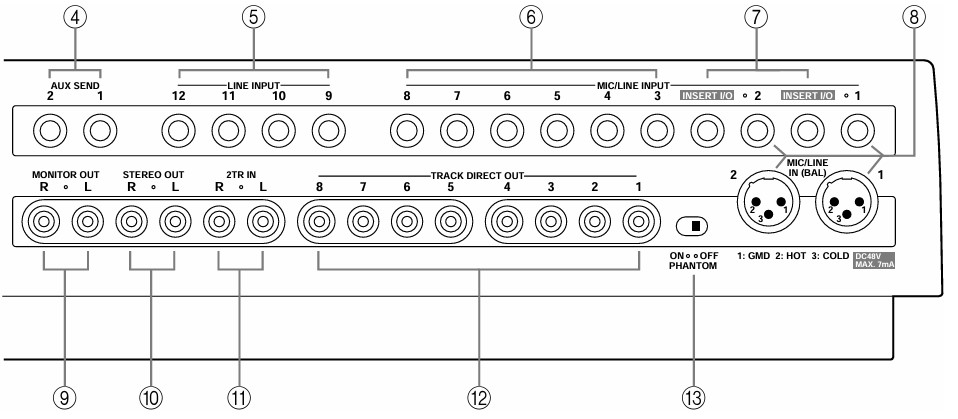
| input socket: | 1 | 2 | 3 | 4 | 5 | 6 | 7 | 8 | 9 | 10 | 11 | 12 |
| XLR | ||||||||||||
| aux out | + TRS* | |||||||||||
| balanced? | unbal / bal |
unbal / bal |
unbal | unbal | unbal | unbal | unbal | unbal | ||||
| routing | direct to track | routing | routing | |||||||||
| Eq | full mixer facilities | basic lvl | basic lvl | |||||||||
*extra TRS insert socket (post-EQ, pre-fader) to add outboard processing such as a compressor or noise gate
Channel strip (for first 8 channels):
Flip switch:
"Mic/Line"
-
channel input is routed through the main EQ and aux send controls
- Minidisc channel is passed through Cue Pan and Cue Level
"PB" (more suitable at mixdown):
- routing is reversed, explained on the Quick Manual page
AUX Send:
- AUX is "Post Fader", usd for inserting external effects
Master section
Line level inputs 9-10 en 11-12 en group assign buttons.
Group Master level: control overall levels sent to Minidisc tracks when recording via the four groups.
2TR In: the signal from an additional stereo input socket on the back panel (to allow you to listen to a stereo source such as a DAT machine during mixdown).
Buttons 1-3 and 2-4: select the group busses for monitoring (pressing either one by itself switches the monitor signal to mono, so that it comes through both speakers; pressing both reverts to stereo).
The Stereo button monitors the stereo bus during mixdown.
Cue allows you to hear the signals on the cue bus, which lets you monitor the sounds assigned to tracks for recording (this is useful for punch in/out and ping-pong recording).
Monitor master level control, which jointly feeds the monitor output and headphone socket, and a final 45mm stereo fader which controls the level emerging from the Stereo Out sockets.
Punch I/O for optional footswitch control of playback, rehearsal, recording or punch in/out.
Display
- current transport status,
-
pitch mode (fixed or +/-12% varispeed),
-
any MIDI sync,
-
the Title (or other message information),
-
Time Counter,
-
Marker status,
-
Punch In and Out indicators,
-
eight Track level meters, and L and R stereo level meters.
Rehearse button
Trying a run through with all the signals coming off disc, mixed in with any external input signals, but without actually recording anything to disc. This makes it easy to try out overdubs before you commit yourself. In this mode, the channel meters show the input levels, rather than the output levels of any signal previously recorded.
Group button alongside the eight Rec Select buttons
If you hold it down when you select a channel on which to record, a small GRP record enable light comes on beneath the appropriate channel meter display.
If you press the Rec Select button alone this illuminates the appropriate meter DIR light. This is a clever way to give maximum recording flexibility without the extra cost of providing eight busses.
Markers
- max 10 markers in a song during recording or playback (adjustable later).
-
Pressing the Mark button inserts one at any time
- press STOP twice to update the TOC.
- the Cue List (Markers) is reached by pressing the Utility button
Punch in/out recording
- manually using the Record and Play buttons during playback
- using any of the Rec Select buttons at the appropriate point and then the Play button again to punch out
- a footswitch: the 1st press starts playback, the 2nd punches in, the 3rd punches out, and the 4th enters pause mode.
- auto Punch In/Out function: set the in and out points with the Rehearse and Play buttons during playback
-
use the Set button in conjunction with the Last Record Search In and Out buttons
Once you have set your In and Out points, pressing the Auto Punch I/O button allows you to select either a single take, or a multi take. If you decide to opt for multiple takes, you get the option to try again after each version (up to 99 are catered for, disc space allowing), but you can't permanently save all of the takes — once you have decided which is the best, you have to choose one to paste into your song, using the Fix Take selections.
Pre‑roll and post‑roll times can be adjusted from 0 to 9 seconds, to give you enough time to get yourself ready before a take. The Adjust button takes you to a different set of selections, where you can audition and change the current value of any marker or punch in/out point.
Ping‑pong recording (ie. bouncing down) is possible from any combination of tracks to any other, and you can overdub additional signals at the same time. Once again, the rehearse function can prove invaluable in setting up levels here. If you want to cycle round a particular song (or songs) you use the Repeat button, and this can be extended to Cue List Playback (with up to 26 steps), using a set of Markers within a song.
Utility button
- Recording Mode (8-track, 4-track, 2-track, or mono),
-
adjust pre-/post-roll time settings,
-
prepare the Cue List,
-
alter Program Play order (ie. the sequence in which a set of songs plays back, like on most CD players),
-
adjust the Display Dimmer (5 levels of brightness),
-
enable/disable Peak Hold (which displays the highest level attained by each channel meter indefinitely until the Display button is pressed),
- look at Disc Info (to see how your Minidisc contents are arranged, for moving, copying and renumbering songs.)
- MIDI functions: MIDI Sync, MMC Receive, MMC Device ID, and Frame Display (the MD8 can only transmit MIDI)
Bounce forward
One thing the MD8 does lack, however, is a dedicated bounce forward function. This is a feature included on Tascam's 564 Minidisc 4-track recorder, whereby you carry out a real-time mixdown of all the 564's four tracks to two tracks in the next Song location on the Minidisc, leaving the original 4‑track Song intact.
The only way to preserve all eight tracks individually is to make a copy of your 8-track Song before you bounce down - a time-consuming process.
Despite the lack of this function, there are other extensive disc housekeeping functions:
- Copy (backup) songs,
-
Move (re-order) songs,
- convert songs from one track format to another,
-
renumber songs,
-
divide and combine songs for use by the Program Playback list.
MIDI
- MIDI Clock changes: 26-step Tempo Map per song
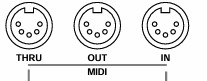
MIDI IN:
-
for receiving MMC commands (MIDI Machine Control)
MIDI OUT:
- outputs
MIDI Clock
- outputs MTC (MIDI Time Code)
MIDI THRU:
- passthrough of MIDI IN signals
ATRAC
Third-generation copies were audibly different, with a slight lack of transparency and a hint of grittiness, but the difference was still very small, so I kept ponging (so to speak). By the sixth generation, the stereo image was beginning to sound rather smeared as well, but the recording was still very usable for things like background pads and washes.
Since I was bouncing a stereo track, I actually had more problems keeping the two channels balanced accurately, due to the lack of precision in fader markings. If you want to record more than eight tracks, the results should be very acceptable, as long as you don't attempt to add EQ at every bouncing stage.
MD
- Minidisk: the version is used in hi-fi recorders to provide up to 74 minutes of dynamically assigned stereo recording time (or 148 minutes in mono), but it cannot be used for multitrack work.
- MD-Data disk, despite having the same 140Mb storage capacity, has a different TOC (Table Of Contents) area which stores details of each recorded section.
The MD8 uses either MD-Audio discs (for stereo or mono recordings) or MD-Data.